Alright I figure this might help someone else trying to get and HID badge to a xem. I was thinking you needed to flash a bootloader or some other more advance configuration to get it in HID Mode. Really its just clone and done…
- After you get your Proxmark3 you will hit. The following site has just about everything you need to get going on windows. To get going right away use the GUI client created by Gaucho.
-
Place your HID badge or token on the coil of the prox reader.
-
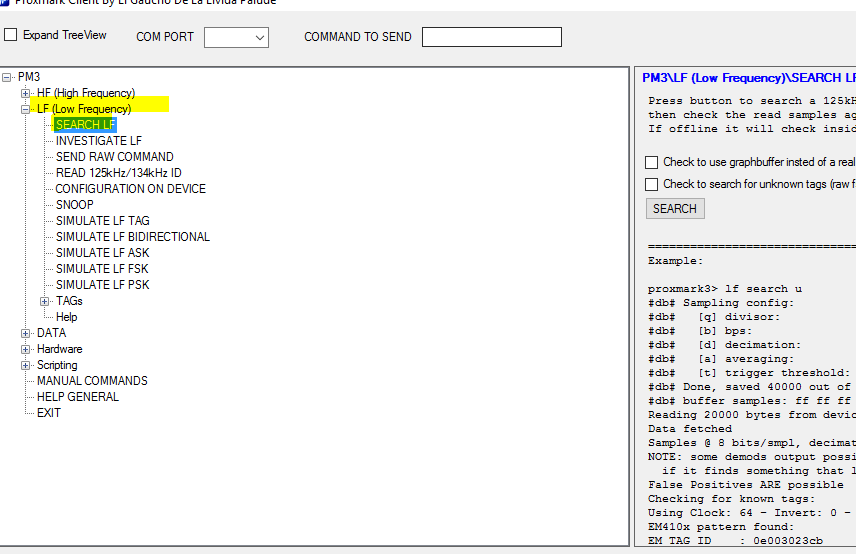
Open the GUI Client and use the Search Lf option (Command is ‘lf search’) Write down the first part of the tag number before the ().

-
At this point we need to find the sweet spot on your implant. In the same Search menu position your hand and hit scan. If you got a good lock it should return as an EM tag (If you never cloned before). Leaving you hand in that same spot follow the next step.
-
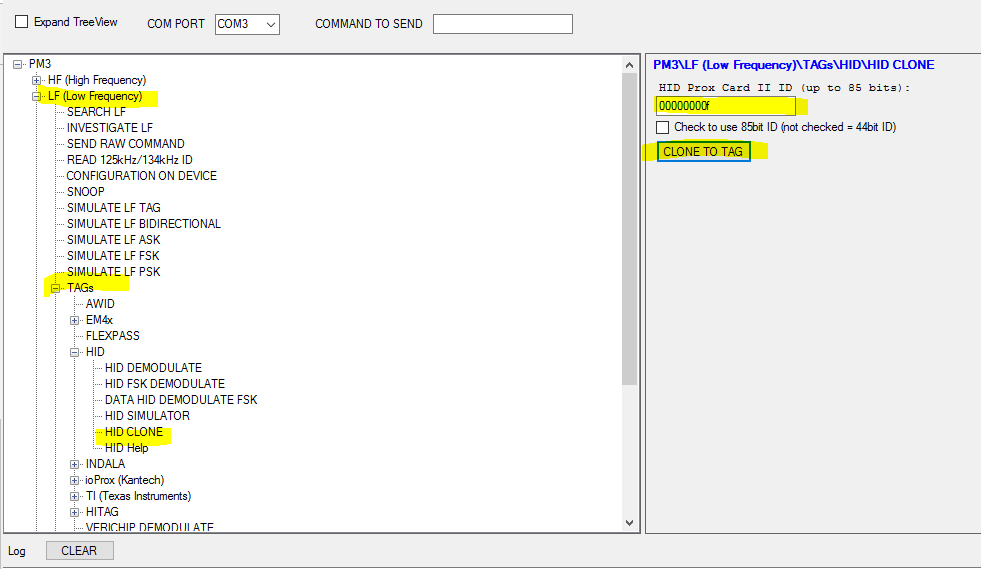
At this point we are ready to clone. Place that number you copied into the HID ID slot then hit Clone to Tag. I personally had to clone twice to get a good write. (Command ‘lf clone XXXXXXXXX’)
-
Check your tag using the LF search option again, it should return as an HID tag with your assigned tag number. If so go try a door scanner or whatever your using it for.
TAGS: xEM to HID ; Clone HID Badge ; ProxMarkIII ; ProxMark3 ; Proxmark