Proxmark3 Troubles

[ See edit at bottom - Likely just another case of bad reads. Even using the booster board though. Suppose the main thing to do is use hf tune to keep looking for better angles to read from. ]

After some time of not using it, I pulled out my Proxmark3 easy I bought from DT, and it doesn’t seem to be working to do things I’ve done successfully in the past. Don’t know if it’s user error from forgetting how to use it or if something’s gone wrong with my equipment. (Did that really bright white PW light always stay on?)

For my NExT, which I’ve written to and read from in the past:

[usb] pm3 --> hf mf rdbl --b 2
[#] Can't select card

And then for the exact same command on the same chip I would also get:

[#] Auth error

I tried it with several different blocks, getting the same results.

For my DESFire the only command that worked was getuid, but after the first couple times I can’t get it working again either. Also, when getuid did work, a couple digits were misread. Most were correct though. (Note that my KBR1 still reads the IDs just fine.)

[usb] pm3 --> hf mfdes getuid
[!!] 🚨 Desfire AID select error.
[-] ⛔ Select or authentication AID 000000 failed. Result [202] Can't
select application by ISO ID.

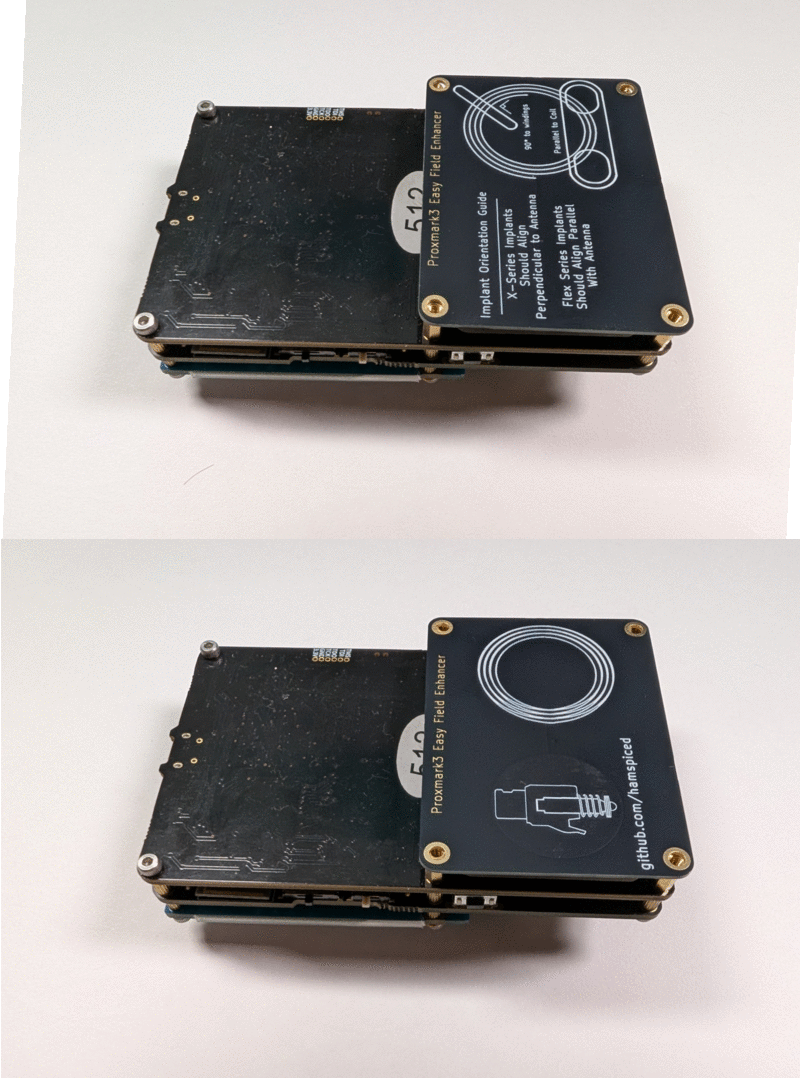
I added @Hamspiced’s Proxmark Booster Board (the backplane), but am still getting the same results. Actually, I’m now getting a voltage increase of about 1000 mV when I place the Proxmark3 against my skin (anywhere, not just over an implant). I installed it as in this picture. (Only difference is I put the screws back in.)

Huh. And just now, this happened:

[usb] pm3 --> hf tune
corrupted size vs. prev_size
/usr/local/bin/pm3: line 253:  3859 Aborted                 $CLIENT "$@"

And then pm3 crashed back to my shell. The line referenced in the error message seems to be the second line of:

if [ "$SCRIPT" = "pm3" ]; then
  CMD() { eval "$EVALENV"; $CLIENT "$@"; }
  HELP() {
      cat << EOF

I haven’t touched the pm3 software on my PC or the firmware on the device since I last used it. Maybe I’ll need to re-flash it but I’d rather try other things first.

I don’t know if the “suspect” in the below means anything. Based on my logs, that’s always been there, even when I was using the device successfully, so I guess not.

    MCU....... AT91SAM7S512 Rev B
    Memory.... 512 KB ( 60% used )

    Client.... Iceman/master/v4.17140-73-g512e7aa94 2023-10-05 15:44:56
    Bootrom... Iceman/master/v4.17140-73-g512e7aa94-suspect 2023-10-05 15:44:23
    OS........ Iceman/master/v4.17140-73-g512e7aa94-suspect 2023-10-05 15:46:00
    Target.... PM3 GENERIC

Looking through my logs, I realise before I was using the mfu rather than mf command. Trying it, I mostly get no return value at all, except once I got it to work except that’s not the correct data that should be on that block. (Should be 57 68 61 74.)

[usb] pm3 --> hf mfu rdbl --b 7
[usb] pm3 --> hf mfu rdbl --b 7
[usb] pm3 --> hf mfu rdbl --b 7

[=] Block#  | Data        | Ascii
[=] -----------------------------
[=] 07/0x07 | 75 73 2F 73 | us/s

[usb] pm3 --> hf mfu rdbl --b 7
[usb] pm3 --> hf mfu rdbl --b 7
[usb] pm3 -->


EDIT:

Should’ve tested this previously. It seems to be working on tags outside of my body, which suggests I’m simply not getting a good read. (Also the mfu data block I thought was wrong because it didn’t match with my logs I found on one of my cheap paper NTAGs where I tested it before writing, so maybe I’ve forgotten which block of my implant I wrote the same message to.) Indeed I’m getting voltage drops instead of increases when scanning the external tags. Will keep fiddling.

EDIT2:

Well, it did work once. Now even on the external tag I’m getting weird results. There are no other tags nearby. But, if I position it right it still works, so I’m still thinking it’s an issue with getting a good read. I do get voltage increases with the external tags as well in some positions.

[usb] pm3 --> hf mfu rdbl --b 7
[#] Warning: HF field is off, ignoring TransmitFor14443a command
[#] Multiple tags detected. Collision after Bit 1
[#] Can't select card (RC:00)
[!] ⚠️  Failed reading block: ( 00 )

[usb] pm3 --> hf mfu rdbl --b 7
[#] Multiple tags detected. Collision after Bit 3
[#] Warning: HF field is off, ignoring TransmitFor14443a command
[#] Multiple tags detected. Collision after Bit 3
[#] Warning: HF field is off, ignoring TransmitFor14443a command
[#] Warning: HF field is off, ignoring TransmitFor14443a command

[usb] pm3 --> hf mfu rdbl --b 7
[#] Can't select card (RC:00)
[!] ⚠️  Failed reading block: ( 00 )

[usb] pm3 --> hf mfu rdbl --b 7
[usb] pm3 --> hf mfu rdbl --b 7
[usb] pm3 --> hf mfu rdbl --b 7
[#] Warning: HF field is off, ignoring TransmitFor14443a command

[=] Block#  | Data        | Ascii
[=] -----------------------------
[=] 07/0x07 | 57 68 61 74 | What

Okay, as I position it particular ways I am able to get mostly consistent reads on my external tags. Guess I just need to fiddle with the positioning for reading my implants through the booster board.

2 Likes

Try updating firmware and maybe using https://proxmark3.app ?

2 Likes

Shamesless plug

1 Like

Updating the firmware now. Waiting for it to compile. I’d forgotten how, so I’m refining my notes, which might become a short guide for linux users. (Really mostly just your guide but without the Windows specific stuff.)

Okay, flashed. Launching…

  8888888b.  888b     d888  .d8888b.
  888   Y88b 8888b   d8888 d88P  Y88b
  888    888 88888b.d88888      .d88P
  888   d88P 888Y88888P888     8888"
  8888888P"  888 Y888P 888      "Y8b.
  888        888  Y8P  888 888    888
  888        888   "   888 Y88b  d88P
  888        888       888  "Y8888P"


  [ I serve the Builders!! ☕ ]

  [ Proxmark3 ]

    MCU....... AT91SAM7S512 Rev B
    Memory.... 512 KB ( 73% used )
    Target.... PM3 GENERIC

    Client.... Iceman/master/v4.21128-419-g5e545a8ed 2026-04-07 17:46:56
    Bootrom... Iceman/master/v4.21128-419-g5e545a8ed-suspect 2026-04-07 17:42:15
eb3e45874
    OS........ Iceman/master/v4.21128-419-g5e545a8ed-suspect 2026-04-07 17:43:26
eb3e45874

Comparing that with what I had before… Yeah, looks like I didn’t have the right version before. Target.... PM3 GENERIC. (Not to mention it was three years old.)

Alright, checking the tuning…

[=] -------- HF Antenna ----------
[+] 13.56 MHz.............  5.08 V
[+]
[+] Approx. Q factor measurement
[+] Peak voltage.......... 1.5
[+] HF antenna ( ok )

Looks good. Will play with it a bit to see if it works better now.

Also, it’s been such a long time I don’t remember the last time I compiled the repo, but it seems that I installed it because I have pm3 and the related scripts in my $PATH under /user/local/bin. (No idea where my old clone of the repo is located.) I assume that compiling alone didn’t update those scripts, so I’m running the copy of pm3 from within the repo for now. I’m assuming that the optional install step of sudo make install would overwrite the outdated scripts in /user/local/bin?

Alright, taking it for a test drive.

1 Like

Am I remembering correctly that the voltage displayed by hf tune is supposed to decrease when I’m positioning it optimally? The chip draws voltage from the reader, and that number indicates how much voltage the reader still has after powering the chip, yes? Because at some angles, I can get voltage drops, but I can also get voltage increases while still getting a read on my external chips. Actually, I’m only having issues reading it when the number is low, so am I remembering it backwards? Though I’m often able to read it when it’s low as well.)

(Also, curiously, in this version Enter no longer ends the hf tune, but the button on the side of the proxmark still does. When I hit Enter the text just flashes momentarily and the tuning continues.)

Mkay, seems like I’m managing to get more reads. Maybe just getting the hang of positioning it. Still get some funny outputs now and then but it’s mostly working as I test it on my implanted NExT. Would these funny outputs be explained by the difficulty of getting a read through my flesh?

[usb] pm3 --> hf mfu rdbl -b1
[#] Warning: HF field is off
[#] Warning: HF field is off
[=] using secure channel... no

[=] Block#  | Data        | Ascii
[=] -----------------------------
[=] 01/0x01 | 32 0A 54 80 | 2.T.

[usb] pm3 --> hf mfu rdbl -b2
[#] BCC1 incorrect, got 0x3b, expected 0x7b
[#] Aborting
[=] using secure channel... no
[#] Cmd Error: card timeout. len: 0

[=] Block#  | Data        | Ascii
[=] -----------------------------
[=] 02/0x02 | EC 48 0F 00 | .H..

[usb] pm3 --> hf mfu rdbl -b2
[=] using secure channel... no

[=] Block#  | Data        | Ascii
[=] -----------------------------
[=] 02/0x02 | EC 48 0F 00 | .H..

[usb] pm3 --> hf mfu rdbl -b3
[=] using secure channel... no

[=] Block#  | Data        | Ascii
[=] -----------------------------
[=] 03/0x03 | E1 10 6D 00 | ..m.

[usb] pm3 --> hf mfu rdbl -b4
[#] Multiple tags detected. Collision after Bit 1
[usb] pm3 --> hf mfu rdbl -b4
[=] using secure channel... no

[=] Block#  | Data        | Ascii
[=] -----------------------------
[=] 04/0x04 | 03 16 D1 01 | ....

As I fiddle with it I’m getting much better at precisely lining up the implants to the very helpful guide that @Hamspiced printed on the backplane while also not touching other parts of the Proxmark with other parts of my body. For one of my implants setting it so it hangs off the edge of the table and rests on just my implant seems to give me good reads. Things seem to be working pretty reliably now for most of my implants (all but the xBT, which is maybe receiving interferance from the rest of my body?). Still confused about hf tune but following hammy’s drawings it’s working great.

1 Like

Xbt is LF so that one shouldn’t use the booster board.

It may be helpful to see how you have the board installed? Is it the midboard or the backplane board?

2 Likes

true;

The hf tune behavior changes quite a bit with the :pig_face: :hot_pepper: repeater board from what I’ve heard.

I have an RDV4, so no repeater board for me… Until I decide that I need more proxmarks and order one from DT. But I think that one PM3 is enough for the time being.

1 Like

To be pedantic, it draws current which sags the voltage in the reader coil.. but yes basically correct. However, with a booster in the mix, you have a second LC tank circuit with it’s own eddy currents and field generation happening.

Phase 1: Primary Coil Energization (Rising Current)

  1. AC current begins flowing through the primary coil, increasing from zero toward peak.

  2. This moving charge generates a magnetic field (B1) that radiates outward from the primary coil in the classic toroidal pattern – field lines emerge from one face, loop around, and return through the other face.

  3. Because this is basically an air-core transformer, the field is not confined by a ferromagnetic core. It spreads out spatially, following the inverse-cube law for a magnetic dipole at distances greater than the coil diameter.

  4. The rate of change of this field (dB1/dt) is what matters for coupling. During the rising portion of the AC cycle, the field is expanding outward.

Phase 2: Field Reaches the Secondary Coil

  1. A portion of B1’s flux lines thread through the area enclosed by the secondary coil. This fraction is described by the coupling coefficient k (0 < k < 1). In air-core systems, k is typically low (0.01-0.3 depending on distance and alignment).

  2. By Faraday’s Law, the changing magnetic flux (dPhi/dt) through the secondary coil induces an EMF (voltage) across the secondary winding: V_induced = -N * dPhi/dt

  3. This induced EMF drives a current through the secondary L/C tank circuit of the booster board.

Phase 3: Secondary Tank Circuit Charges (First Half-Cycle)

  1. The induced current flows through the secondary inductor (L) and charges the capacitor (C). Energy is being transferred from the magnetic field into the electric field of the capacitor.

  2. As current flows through the secondary coil, it generates its own magnetic field (B2). By Lenz’s Law, B2 is oriented to oppose the change in flux that created it – so B2 partially opposes B1.

  3. The net field in the coupling region is now B1 - B2 (vectorially). This is “reflected impedance” – the primary sees a load because the secondary’s opposing field effectively resists the primary’s field, requiring more energy from the primary source.

  4. Current continues flowing until the capacitor is fully charged. At this instant, all the energy in the secondary is stored in the electric field of the capacitor, and current through the secondary inductor is momentarily zero. B2 = 0 at this instant.

Phase 4: Capacitor Discharges Back Through Secondary Inductor (Field Reversal)

  1. The capacitor now begins to discharge back through the secondary inductor, driving current in the opposite direction.

  2. This reversed current creates a new magnetic field B2 that is now oriented in the opposite direction from the original B2. Instead of opposing B1, it may now be reinforcing it (depending on where in the primary’s AC cycle we are).

  3. The energy oscillates: capacitor (E-field) → inductor (B-field) → capacitor → inductor… at the resonant frequency f = 1 / (2pi * sqrt(LC)).

  4. Each time current flows through the secondary inductor (in either direction), it creates a magnetic field that radiates back toward the primary coil, influencing it.

Phase 5: Resonant Energy Exchange (Steady State)

  1. At resonance – when the primary driving frequency matches the secondary’s natural frequency 1/(2pisqrt(LC)) – something critical happens: the secondary’s oscillations are phase-aligned with the driving signal such that energy transfer is maximized.

  2. The secondary current (and thus B2) is 90 degrees out of phase with the induced EMF, and the voltage across the capacitor can build up to values much larger than the initial induced EMF (voltage amplification by the Q factor of the tank).

  3. The interaction between fields becomes a continuous dance:

    Primary cycle: B1 rising → B1 peak → B1 falling → B1 reversed
    | | | |
    Secondary tank: Current in L Energy in C Current in L Energy in C
    (B2 opposes) (B2 = 0) (B2 reverses) (B2 = 0)

Phase 6: The Field Superposition Picture

  1. At any instant, the total magnetic field at any point in space is the vector sum of B1 + B2. Neither coil “owns” the field – it’s one unified field with contributions from both.

  2. When the secondary is at resonance with no load:

    • The Q factor determines how much energy accumulates in the tank. High Q means large circulating currents and strong B2.

    • B2 can become comparable in magnitude to B1 in the coupling region, even though only a fraction of B1 reaches the secondary. The resonant buildup amplifies the response.

    • The secondary’s field reaches back to the primary, modifying the impedance the primary source sees. This is the mechanism of reflected impedance.

Key Insight

The fields don’t take turns – they coexist and superpose continuously. The useful mental model is:

  1. Primary creates a time-varying field.

  2. Secondary responds with its own time-varying field (phase-shifted).

  3. These two fields add vectorially everywhere in space at every instant.

  4. At resonance, the timing of B2 relative to B1 is such that maximum energy remains circulating in the secondary.

  5. Without a load, the only losses are resistive (wire resistance) and radiative, so the tank rings with high Q and B2 is strong relative to what you’d expect from the weak coupling.

The “collapse and re-expansion” is really the continuous sinusoidal oscillation of energy between the capacitor’s electric field and the inductor’s magnetic field, with the magnetic field component reaching back into the shared coupling space and interacting with the primary’s field on every cycle.

Given that the booster board and proxmark3 are not perfectly matched, and the inclusion of a 3rd coil (the transponder) in the mix.. it’s almost like the 3 body problem.. behavior is going to be difficult to model exactly, which is why it would be very hard to make the hf tune function properly with booster in the mix. There are some gross observations that do seem to hold true though, like a drastically lower measured voltage, and sometimes the voltage appears to go up.. likely because it does (at the time of measure) as the co-mingling of 3 different coils in the same shared field interacting together is a soup of magnetic flux.

3 Likes

Pedantic is good. I suck at electronics but am trying to make sense of it. As a believer in elaborative rehearsal I appreciate being exposed to the finer details.

Ah, that would do it. Using the correct side of the pm3 (w/ your prototype attached. see below) I get excellent and reliable reads.

Backplane. I installed it like in your picture here.

But also… I have that prototype you generously sent me the first time I was learning to use my pm3. I taped it on there and I don’t remember if I taped it there because that’s where I found it was working well or if maybe I just stuck it there to avoid losing it. So I said, “I’m not gonna touch that,” and just left it where I had it and zoned out that it was even there. But it’s right smack dab in the middle of the lf antenna (which is not at all where you told me to put it) so I’m sceptic it was doing me much good in that particular position anyway.

Intuitively, it would make sense that the extra prototype resonance repeater might affect my reads. Now after @amal’s explanation, it makes a lot of sense that it’s probably affecting my reads quite a bit.

Indeed. Looking back through my notes I’m reminded that I observed similar fluctuations when I tested that prototype in the picture. But also, when I use it, especially with the implant lined up precisely with the image on the completed product, I get much more reliable reads than I’ve ever gotten without a repeater (and that’s even with two on there by accident). I do recommend it.

Actually…

I took off the prototype repeater and now I can’t get a read on anything. I put it back on in the exact same spot and I still can’t get reads. Nothing. I borked it. It was working so well and then I borked it!

My hypothesis: There’s a step during flashing the firmware in which we place the reader away from any metal or tags. Presumably some calibration happens at that time. I calibrated with the prototype repeater on there. Now that I’ve removed it, I’ve screwed up all that calibration. In which case the solution would be to flash the firmware again. (But it was working so very well with the extra repeater there, I’m quite tempted to keep it on there permenantly.)

Fortunately at this stage that’s just a quick ./pm3-flash-all without having to wait through the long compile step.

Noooo! It’s still not working as well as it was.

Huh. Although Enter now works to end the tuning. Speaking of which… I just tried lf tune on my xLED implants… Very interesting being able to see where the brightest positions and angles are. I think this is how I will use hf and lf tune going forward. Ahhh… and now that I found the bright quarter of the lf antenna I’m able to read the xBT again! Not getting as reliable reads as I was before, but still. Hah! And by the same technique I’ve discovered the even better sweet spot for the hf implants!

Okay, since flashing the fullimage is so quick I’ll flash it again but without the prototype so we can compare. For science! (Or at least a hacker’s approximation if it.)

Hmm… Could be my imagination (this black magic electromagnetic fields), but I think it worked slightly better with the prototype on there like it was in the picture. Flashing again with it back on.

Hey, four for four! Almost every try is an immediate success! Call be superstitious but I’m leaving that prototype where it is (at least until a future accumulation of data proves this anecdotal experience to be a fluke).

1 Like

Yeah I’d probably remove that prototype. You have two repeaters on the device and right over the LF coil like that likely isn’t doing it any good.

3 Likes

Probably. Logically. But currently I’m getting better reads from both ends with it on. Most likely a fluke, but still. Right now it’s working and “if it ain’t broke, don’t fix it.” If I do have issues with it again in the future though, removing the prototype and re-flashing will be the first thing I try.

2 Likes